

Description
Download My Photoset APK – Flickr photosets, Android photography app, offline photo viewing, photo set viewer, Flickr app, free photo app
Overview
My Photoset is a dedicated Android application designed to bring favorite Flickr photosets directly to mobile devices. The app enables users to access curated collections of images from Flickr by simply entering a photoset ID, streamlining the process of viewing and organizing visual content on the go. It serves as a practical tool for photography enthusiasts, travel bloggers, and anyone who values curated visual storytelling through image sets. The app’s core function is to provide a portable, reliable way to revisit photo collections without relying on constant internet access.
By saving all photos to the user’s SDCard, My Photoset ensures that content remains accessible even in offline environments, making it ideal for travelers, educators, or individuals in areas with limited connectivity. The ability to view detailed metadata and user comments enhances the experience, allowing for deeper engagement with the content and its creators. While the developer, Magetys, is known for creating lightweight, functional tools, no additional background details were provided beyond the app’s name and purpose.
Real-world usage scenarios include reviewing travel photography from past trips, sharing curated image sets with students or clients, or simply enjoying high-quality visuals during downtime. The app operates as a standalone viewer, focusing exclusively on Flickr photosets without integrating broader social media features.
Key Features & Capabilities
- Photoset ID Entry – Users can input a unique Flickr photoset ID to instantly access and view the associated collection of images.
- Offline Photo Access – All photos are stored locally on the SDCard, enabling full viewing without an active internet connection.
- Photo Details & Comments – Each image displays metadata and user comments, offering context and interactivity.
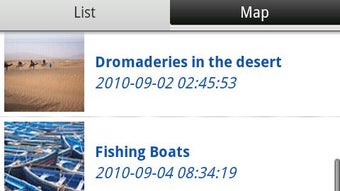
- List and Map View Modes – Images can be browsed in a simple list format or explored geographically via a map interface, depending on the photoset’s location data.
- Lightweight Design – The app is optimized for minimal resource usage, making it suitable for devices with limited storage and processing power.
These features allow users to organize and revisit visual content efficiently. For instance, a travel photographer might use the map view to relive a journey by seeing where each photo was taken. A student could download educational image sets for offline study. The combination of offline access and metadata visibility makes the app particularly useful for learning, presentation, and personal archiving purposes.
User Interface, Workflow & Performance
My Photoset features a clean, minimal interface focused on usability and fast access. Navigation is straightforward, with a central input field for the photoset ID and immediate loading of the image collection. The app supports two viewing modes: a linear list for quick browsing and a map-based layout that displays geotagged photos on a visual map.
Workflow efficiency is enhanced by the direct entry of photoset IDs, eliminating the need for account logins or complex setup processes. The app appears to prioritize speed and simplicity, aligning with its role as a lightweight utility. However, exact performance details were not specified, including CPU or RAM usage during operation. General software behavior suggests stable performance on modern Android devices, but no benchmark data was provided.
Stability and reliability appear to be core design goals, as the app functions without requiring continuous online access. The developer did not provide information on crash rates, update frequency, or background processes. Users should expect consistent behavior based on typical lightweight Android app patterns, though actual performance may vary depending on device hardware and storage conditions.
Compatibility & System Requirements
My Photoset is designed for Android devices and is compatible with the platform as of its release date. The app version is 1.2.1, and the installation size is 1.4 MB, indicating a highly compact footprint. This small size suggests it is optimized for devices with limited storage space.
Specific operating system versions or hardware requirements were not listed. The developer did not specify minimum Android versions or recommended device specifications. Compatibility information is limited to the platform name, with no further details on supported screen sizes, processor types, or memory configurations.
Users should ensure their device runs a modern Android version to avoid compatibility issues. The app’s reliance on SDCard storage implies that external storage access is required, so devices must allow file system permissions for the app to function properly.
Pros and Cons
Pros
- Free to download and use with no in-app purchases
- Offline access to Flickr photosets via local storage
- Minimal file size (1.4 MB) and low resource demands
- Simple, intuitive interface with direct ID input
- Supports both list and map-based photo viewing
Cons
- No information on supported Android versions or hardware specs
- Requires manual entry of photoset IDs – no search or discovery feature
- Limited to Flickr photosets only – no support for other platforms
- No built-in photo editing or sharing tools
- Offline storage depends on user’s SDCard availability and permissions
FAQ Section
Is My Photoset available for iOS devices?
My Photoset is currently designed exclusively for Android. No iOS version has been announced or released.
Can I use My Photoset without an internet connection?
Yes. Once a photoset is loaded, all images are saved to the SDCard, allowing full offline viewing.
Do I need a Flickr account to use this app?
No. The app only requires the photoset ID. A Flickr account is not necessary to view public photosets.
How do I find a photoset ID?
Photoset IDs can be found in the URL of a Flickr photoset page, typically appearing after the “id=” parameter.
Is My Photoset safe to download and use?
As a free app developed by Magetys, My Photoset is designed to be secure. It accesses only the SDCard and does not collect personal data. Users should ensure downloads come from trusted sources.
Final Thoughts + CTA
My Photoset delivers a focused, efficient solution for users who want to carry their favorite Flickr photosets on Android devices. Its lightweight design, offline functionality, and straightforward interface make it a reliable companion for photography lovers, educators, and travelers. While it lacks advanced features like search, editing, or multi-platform support, its simplicity is its strength.
For those who value curated visual content and the ability to view images without internet dependency, this app offers a practical and secure experience. The free pricing model and minimal system requirements further enhance its accessibility.
Download My Photoset now to bring your favorite Flickr collections with you anywhere, anytime.
Guides & Tutorials for My Photoset APK
How to install My Photoset APK
- Click the Preview / Download button above.
- Once redirected, accept the terms and click Install.
- Wait for the My Photoset APK download to finish on your device.
How to use My Photoset APK
This software is primarily used for its core features described above. Open the app after installation to explore its capabilities.
User Reviews for My Photoset APK 0
No reviews found





